
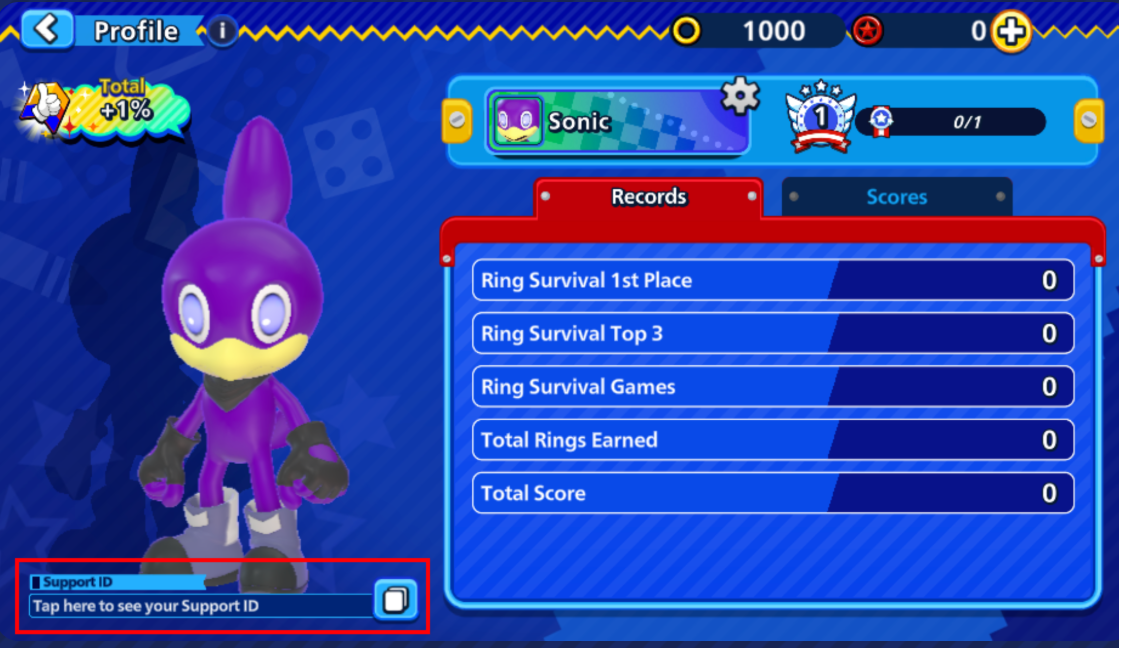
1.) Log in to the Rumble Store's website using your in-game Support ID.
*You can find your Support ID in your in-game profile.
2.) Select the products you wish to buy, then choose how you'd like to pay.
3.) Enter all the necessary info for the payment method that you chose to finish your purchase.
4.) Success! The items you bought will be added to your account the next time you log in to Sonic Rumble!
・You currently can't purchase from Japan.
・You will receive the items you bought from the Rumble Store once you open the Home screen in-game. However, if you don't receive your items, please try restarting the game.
・Please check out the Rumble Store's website for all the available payment methods.
・The amount you can buy for any item is shared between the in-game shop and the Rumble Store.
・The total amount of money you're allowed to spend every month based on your age is shared between the game and the Rumble Store.
・Please keep in mind that item details can change anytime without prior warning.